Friday, September 14, 2012

LOVE MATLAB


MATLAB

MATrix LABoratory is a high level language with interactive environment developed by MathWorks. It was designed to aid numerical computation, visualization and application development. It also allows matrix manipulations, plotting of functions and data, and interfacing with programs written in other languages like C, C++, Java and Fortran. One can write programs and develop algorithms faster than traditional languages.

Key Features
  • Interactive environment for iterative exploration, design, and problem solving 
  • Mathematical functions for linear algebra, statistics, Fourier analysis, filtering, optimization, numerical integration, and solving ordinary differential equations 
  • Built-in graphics for visualizing data and tools for creating custom plots 
  • Tools for building applications with custom graphical interfaces


NUMERIC COMPUTATIONS (Methods)

  • Interpolation and regression 
  • Differentiation and integration 
  • Linear systems of equation 
  • Fourier analysis 
  • Eigenvalues and singular values 
  • Ordinary differential equations (ODEs) 
  • Sparse matrices


DATA ANALYSIS AND COMPUTATIONS

  • Acquiring Data: Accessing through files, other applications, databases and external devices (e.g. Microsoft Excel, image, sound, video files)
  • Analyzing Data: Manage, filter, and preprocess your data. Add-on products provide capabilities for curve and surface fitting, multivariate statistics, spectral analysis, image analysis, system identification, and other analysis tasks
  • Visualizing Data: MATLAB provides built-in 2-D and 3-D plotting functions; Plots can be customized either interactively or programmatically. 
MATLAB Plot Gallery

  • Documenting and Sharing Results: Automatically generates a report when you execute a MATLAB program. The report contains your code, comments, and program results, including plots. Reports can be published in a variety of formats, such as HTML, PDF, Word, or LaTeX.


PROGRAMMING AND ALGORITHM DEVELOPMENT
MATLAB provides features of traditional programming languages, including flow control, error handling, and object-oriented programming (OOP). You can use fundamental data types or advanced data structures, or you can define custom data types.

Development Tools: MATLAB includes a variety of tools for efficient algorithm development including: 
  • Command Window - Lets you interactively enter data, execute commands and programs, and display result 
  • MATLAB Editor - Provides editing and debugging features, such as setting breakpoints and stepping through individual lines of code 
  • Code Analyzer - Automatically checks code for problems and recommends modifications to maximize performance and maintainability 
  • MATLAB Profiler - Measures performance of MATLAB programs and identifies areas of code to modify for improvement 

APPLICATION DEVELOPMENT AND DEPLOYMENT

Designing Graphical User Interface: Using GUIDE (Graphical User Interface Development Environment), you can lay out, design, and edit custom graphical user interfaces. You can include common controls such as list boxes, pull-down menus, and push buttons, as well as MATLAB plots. Graphical user interfaces can also be created programmatically using MATLAB functions.


WHO'S WHO?

Cleve Barry Moler

Cleve Moler is the chief mathematician, chairman, and cofounder of MathWorks. He received his bachelor's degree from Caltech in 1961 and Ph.D. from Stanford University. He is the chairman of the computer science department at the University of Mexico when he started developing MatLab in the 1970s. His design of MatLab is intended to give his students access to LINPACK and EISPACK without them having to learn Fortran.


According to Moler, his creation of MatLab was very primitive, written in Fortran and was hardly even a programming language. He acknowledged Jack Little’s involvement in giving a promising debut to MatLab. He added, as he is the Father of MatLab Little is the real heart and soul and the basis for the success of the company, MathWorks.


John (Jack) Little

Jack Little is the president and one of the founders of MathWorks. He holds a bachelors degree in Electrical Engineering and Computer Science from Massachusetts Institute of Technology (1978) and also receive his Master’s degree from Stanford University (1980).

In 1979 Little was first exposed to MatLab during a visit of Cleve Moler to Stanford University. He heard about MATLAB from some friends that took Moler’s course. Realizing the helpful use of MatLab in engineering he then joined Moler and his friend Steve Bangert in rewriting MatLab in C and founding MathWorks in 1984.

HISTORY

The history of MATLAB starts in the early 1970s, with the development of two libraries of FORTRAN mathematical subroutines in the mid-1970s under a grant from the National Science Foundation. These two libraries were called LINPACK and EISPACK.

LINPACK was written by Jack Dongarra, Jim Bunch, Cleve Moler, and Pete Stewart.

 Jim Bunch                                 Jack Dongarra                               Pete Stewart

In order to make these packages easier for students to use, Moler created MATLAB, whose name is a contraction of "Matrix Laboratory."

The original MATLAB was a FORTRAN program designed for the era of timesharing and ASCII terminals. It had only one data type (the matrix of complex doubles) and a fixed collection of 80 functions. Moler used the FORTRAN MATLAB in teaching numerical analysis at Stanford in 1979.

Word of the program reached Jack Little, who grasped the potential of MATLAB in signal processing and control, and the possibility of making a successful software product based on MATLAB for the new IBM PC.

Jack Little and Steve Bangert developed PC MATLAB by porting Moler's code from FORTRAN to C, adding user-defined functions (in effect making MATLAB into a programming language rather than a calculator), improved graphics, and libraries of MATLAB routines, the toolboxes. Moler, Little, and Bangert formed the Mathworks in 1984, with PC MATLAB as the first product. Their first sale was an order for ten copies placed by Professor Nick Trefethen at MIT.

There have been several major revisions and enhancements to MATLAB, including an extended set of graphics tools and primitives, multidimensional arrays and lists (known in MATLAB as cell arrays), classes and objects, economical storage schemes and algorithms for sparse matrices, a debugger, a profiler, a GUI builder, a lower cost student edition, and Just-In-Time (JIT) compilation for improved performance. The computational core has been upgraded through the incorporation LAPACK (a state-of-the-art library for matrix computation), as well as software for computation of definite integrals, integration of ordinary differential equations, and root finders. Toolboxes created by the Mathworks and other contributors have expanded the scope of MATLAB, adding capabilities in areas such as optimization, signal and image processing, fuzzy logic, splines, wavelets, statistics, partial differential equations, bioinformatics, and mathematical finance. SIMULINK, an extensible block diagram environment for simulation and model-based design appeared as a second Mathworks product in 1990.



The Mathworks logo is a picture (generated by MATLAB) of a numerical approximation to the fundamental mode of a vibrating L-shaped membrane, a topic that Moler discussed in his Stanford Ph.D. thesis in 1965.


ACCESSING MATLAB


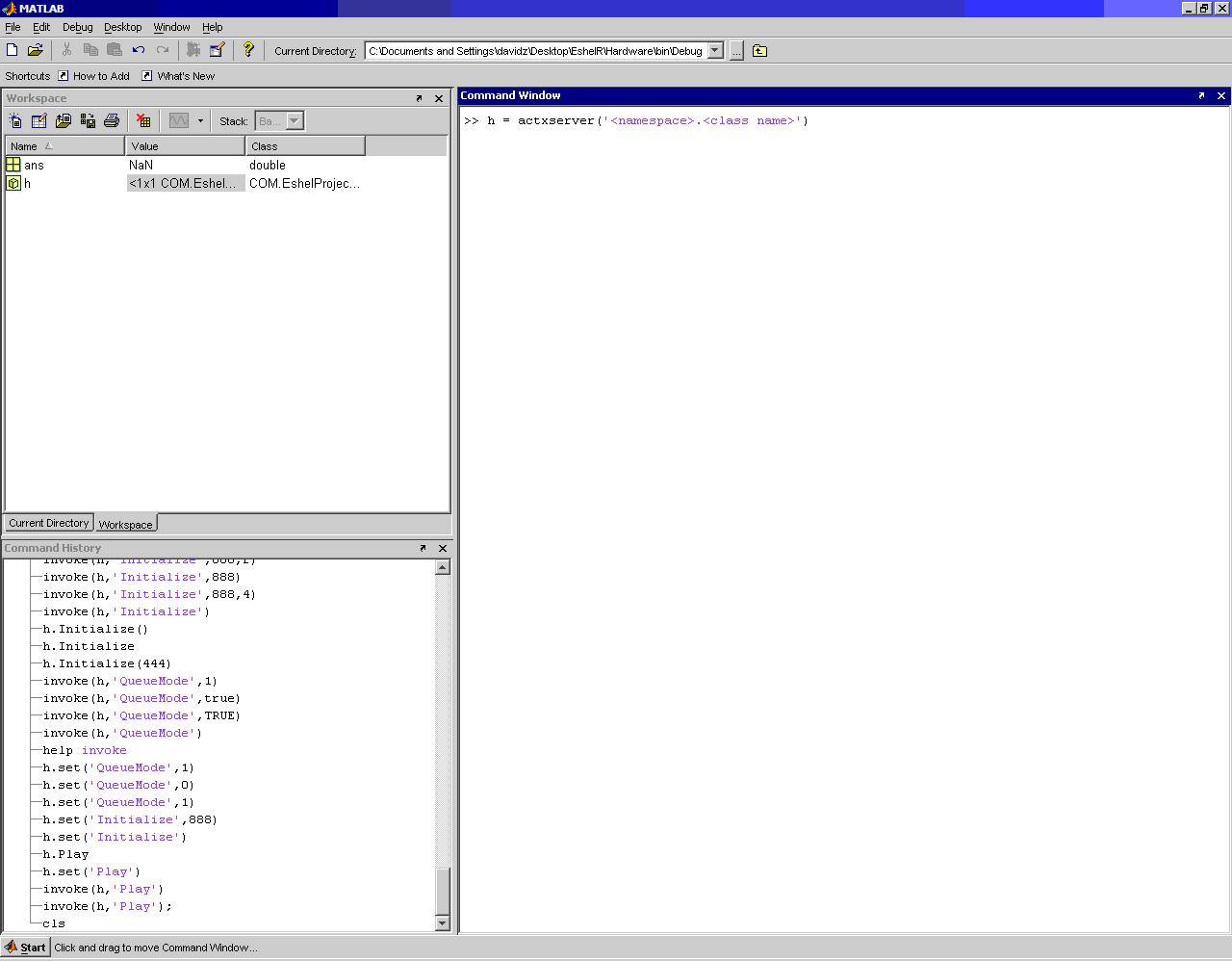
1 By default, MATLAB console looks like this (with file browser and command history):
2 To use MatLab without console, use –nojvm flag.

3 Matlab can be run in background. For long running labs, there are 2 options.

          a Under csh,

matlab < matlab.in >& matlab.out &

          b Under bash, 

matlab < matlab.in > matlab.out 2>&1 &

Note: Redirecting error messages are critical and cannot be retrieved.

MATLAB BASICS


SYMBOL/ COMMANDS
FUNCTIONS/DESCRIPTION
%
 comment character
Variable Name
 maximum of 63 characters
Three periods (…)
 usually at the end of the line
 allows continuation
;
 terminates displaying of output in the input line
ans
 default object storage
 holds the current object value until the next statement is executed
help (text)
helpwin (separate window)
doc (browser)
lookfor (apropos)
 available help is accessible by using this

Remarks
     1 Use single quotes, not double quotes.
     2 Emacs-style editing is always available at the command line.


SAMPLE CODE

% HELLO is a simple script to say “Hello, world!”
%
%  Licensing:
%
%    This code is distributed under the GNU LGPL license.
%
%  Modified:
%
%    26 January 2007
%
%  Author:
%
%    John Burkardt
%
  fprintf ( 1, '\n' );
  fprintf ( 1, 'HELLO:\n' );
  fprintf ( 1, '  MATLAB version\n' );
  fprintf ( 1, '  This is how to say:\n' );
  fprintf ( 1, '\n' );
  fprintf ( 1, '  Hello, world!\n' );

  quit


>> hello_run
HELLO_RUN will run the "hello.m" M file.
Hello, world!
Elapsed time is 0.024424 seconds.
HELLO_RUN: Normal end of execution.
>> 

Some insights

"Pros"

“At the time, I was still convinced that C was the way to go, so the first advanced item I learned how to do was to use the MEX interface. I eventually realized the error of my ways and slowly began to learn about vectorization and logical indexing through the resident MATLAB guru in my group, and the rest is history! I’m now convinced that MATLAB is one of the best and most accessible programming paradigms in existence for scientific computing.”

-Bryant Tran (Cody Champion)

 "MATLAB is the language of choice for people doing mathematical development".

-Randy Allen, Chief Executive Officer of Catalytic (Palo Alto, Calif.)

Members

Emirrah said, "MATLAB? It's simply AMAZING."
Briar said, "."
Leira said, "One got to love MATLAB because of its fantastic features. In our CMSC150 class, I am so fascinated with how Maxima manipulates such numerical computations. But with what MATLAB has to offer, everything will be easier especially on computing. Furthermore, it is interactive at its finest. I hope UPLB-ICS will use MATLAB in the near future."
Tricia said, "MATLAB is exceptionally a complete programming language at its own field. It has everything any numerical computing has to offer. It is interactive. However it will consume very large chunks of your computer memory. Then again, space has to suffer for wholeness.”

Sources

http://www.mathworks.com/products/matlab/

Brought to you by

lotlotandfriends CMSC 124 T-1L
Dogelio, Emirrah Hazelle
Nuestro, Briar Rose B. 2010-11820
Panol, Maria Leira P.
Posadas, Tricia Joy R.

Tuesday, September 4, 2012

LUA

What is Lua?

Lua is a powerful, fast, lightweight, embeddable scripting language.
Lua combines simple procedural syntax with powerful data description constructs based on associative arrays and extensible semantics. Lua is dynamically typed, runs by interpreting bytecode for a register-based virtual machine, and has automatic memory management with incremental garbage collection, making it ideal for configuration, scripting, and rapid prototyping.


Where does Lua come from?

Lua is a scripting language born in 1993 at PUC-Rio, the Pontifical Catholic University of Rio de Janeiro in Brazil.
Since then, Lua has evolved to become widely used in all kinds of industrial applications, such as robotics, literate programming, distributed business, image processing, extensible text editors, Ethernet switches, bioinformatics, finite element packages, web development, and more. In particular, Lua is one of the leading scripting languages in game development.


What's in a name?

"Lua" (pronounced LOO-ah) means "Moon" in Portuguese. As such, it is neither an acronym nor an abbreviation, but a noun. More specifically, "Lua" is a name, the name of the Earth's moon and the name of the language. Like most names, it should be written in lower case with an initial capital, that is, "Lua". Please do not write it as "LUA", which is both ugly and confusing, because then it becomes an acronym with different meanings for different people. So, please, write "Lua" right!
Why choose Lua?

  • PROVEN, ROBUST language
  • FAST   
  • PORTABLE.
  • EMBEDDABLE.
  • POWERFUL (but SIMPLE)
  • SMALL
  • FREE
  • EXPRESSIVE

One-on-One:

  • Lua Vs Python


Lua 's not whitespace sensitive. While this has its downsides when compared with Python, there is no need to worry about automatic editor space-to-tab conversion or vice versa. When using a proportional width font, Lua allows use of as much indentation as necessary to make the code easy to read.


Python is extremely high performance numeric computing (ala scientific and graphics) is possible with an add-on module that implements true multidimensional arrays. Strictly speaking, Lua has no arrays and must use a table structure for them.


When it comes to OO models, Python dictates a specific model for object-oriented programming. It has rich OO capabilities, including metaclasses, multiple inheritance, and so on. Lua does not dictate any particular OO system. Instead you can build your own (using meta-methods) and tailor it to your needs.
  • Lua Vs Perl
Memory Management:

 Lua 5.1 has an incremental garbage collector. Perl uses a simple but efficient reference-based garbage collection that will leak on cycles.


Stability: 

Very few bugs can be found in Lua. The code is small, highly stable, and extensively reviewed. The Perl core is larger, does more, and is much more complex, so naturally it would be harder to ensure validity. That said, Perl is widely used and tested, and the core is generally quite stable. If one includes non-core modules, then Perl may be more stable/mature in general. 

  • Lua Vs Go
Types:
Go has a larger number of built-in types (e.g. integers of various sizes and signedness), whereas Lua code normally just uses the number type (typically floating point).
Multiple  return values are supported by both languages. Strings are immutable in Go and Lua. 
Pointers:
Go has pointers but no pointer arithmetic, for safety. Lua has no pointers.
  • Lua Vs Ruby                                Lua  already had a very good VM which allows Lua programs to be compiled and also to execute a lot faster than Ruby(x2 in most case).

SAMPLE PROGRAMS:

  • Hello World!


  • Factorial


Strings in Lua are subject to automatic memory management, like all Lua objects. That means that you do not have to worry about allocation and deallocation of strings; Lua handles this for you. A string may contain a single letter or an entire book. Lua handles long strings quite efficiently. Programs that manipulate strings with 100K or 1M characters are not unusual in Lua!!!

There is a function called "dofile" which is very useful when you are testing a piece of code. You can work with two windows: One of them is a text editor with your program (in a file prog.lua, say) and the other is a console running Lua in interactive mode. After saving a modification that you make to your program, you execute dofile("prog.lua") in the Lua console to load the new code; then you can exercise the new code, calling its functions and printing the results.


QUOTEs:

“Lua is a brilliant, tiny powerhouse.” 
Lucas Ackerman, in rec.games.roguelike.development (2003).

“Lua - The most useful piece of truly free software I've ever used.” 
David Jeske, in his list of recommended products (2000?).
“This fine, little, free scripting engine is one of the most reusable parts in software industry I ever found. I could not imagine any better way of incorporating a scripting system into a game engine than this one.” 
Harald Nowak, in the Station 5 web site.
“If you compare Scheme and Lua for the things you'd want in a game console scripting language, I think Lua will come out ahead. It's smaller, portable, uses less memory, and is faster.”Steve Dekorte, in comp.lang.objective-c (1997).
“Learn it at once. It's lovely.”
Rob Kendrick, in comp.sys.acorn.programmer (2000).


Heart to Heart :">

"I thought that Lua is just like a child of python but when you read more about it, you'll discover that it offers more. =) It's more readable and writable compare to other PLs. Small but terrible...fast and easy to extend." 
-Vice Ganda 2010-41749 T-9L
 "I think it's cool. But the name sucks." -Zukee 2010-57236    T-9L
Installer for Windows: Lua For Windows
Programming in LuaCode Examples

References:


http://www.lua.org/pil/1.1.html
http://www.lua.org/quotes.html


CMSC 124 LUA MEMBERS:
2010-41749 Vice Ganda
2010-57236 Zukee


Thursday, August 16, 2012

Objective-C


I. Description

  •  Object-oriented programming language
  •  Strict Superset of C:
    • C with some new additional constructs
    • C code compiles as Objective-C code
    • C libraries can be linked and used natively from Objective-c
  • Adds Objected-oriented features to C
    • Defining classes
    • Implementing methods
    • Instantiating classes and objects
    • Ivoking class and object methods
    • Protocols, categories, selectors, forwarding

II. History

         
         Objective-C is a general-purpose, high-level, object oriented language which lies on top of the C language that adds Smalltalk-style messaging. Its primary use in modern computing is on Mac OS X as a desktop language and also on iPhone OS. It was originally the main language for NeXTSTEP OS, also known as the operating system Apple bought and descended Mac OS X from, which explains why its primary home today lays on Apple's operating systems.

         Objective-C was created primarily by Brad Cox and Tom Love in the early 1980s at their company Stepstone. Both had been introduced to Smalltalk while at ITT Corporation's Programming Technology Center in 1981. The earliest work on Objective-C traces back to around that time.
Because Objective-C is a strict superset of C, we are free to use C in an Objective-C file and it will compile fine. Because any compiler of Objective-C will also compile any straight C code passed into it, we have all the power of C along with the power of objects provided by Objective-C.


III. Syntax


Sample Program in Objective-C


IV. Insights

"Shedding Light on Objective-C and Cocoa"
Jon Manning and Paris Buttfield-Addison share their insight on Objective-C
"Advantages of Using Objective-C over C++"
People talk about how great Objective-C is over C++
 Sir Duldulao on Objective-C via Facebook


V. Project

Building Calculator Using Objective-C Tutorial
Coding of calculator app with GUI(Graphical User Interface) Using GNUStep GORM


VI. Group Members

CMSC 124 T-7L
Paul Elessar Caceres (2009-10232)
John Carlos Gambol (2009-26302)
Berlyn Motel (2009-18986)
Mary Grace Primavera (2009-32348)
Graycel Santos (2009-32132)


VI. References

www.gnustep.org
www.slideshare.net
en.wikipedia.org/wiki/Objective-c
mobile.tutsplus.com
www.otierney.net
www.gnustep.org/experience/Gorm.html
cocoadevcentral.com
developer.apple.com
www.dailymotion.com

Wednesday, August 15, 2012


SCHEME is a functional programming language and one of the two main dialects of the programming language Lisp. Unlike Common Lisp, the other main dialect, Scheme follows a minimalist design philosophy specifying a small standard core with powerful tools for language extension. Its compactness and elegance have made it popular with educators, language designers, programmers, implementors, and hobbyists. The language's diverse appeal is seen as a strong point, though the consequently wide divergence between implementations is seen as one of the language's weak points.


--------------------------------------------------------

Origin
    
       Scheme started as an attempt to understand Carl Hewitt's actor model, for which purpose Steele and Sussman wrote a "tiny Lisp interpreter" using MacLisp and then "added mechanisms for creating actors and sending messages." Scheme was originally called "Schemer", in the tradition of other Lisp-derived languages like Planner or Conniver. The current name resulted from the authors' use of the ITS Operating System, which limited filenames to two components of at most six characters each. Currently, "Schemer" is commonly used to refer to a Scheme programmer.

---------------------------------------------------------------------------------------------

Features


  • Scheme is a functional programming language.
  • Implements proper tail recursion.
  • Uses prefix notation.
  • Unnamed functions can be named using the keyword lambda.
  • Has The ability to handle numbers of different numeric types (e.g. integer, rational, complex, real) and exactness (i.e. exact and inexact).
  • Scheme supports continuations. Continuations represent the "future" of computation at a particular point in program execution.
--------------------------------------------------------

Data Types
  • Characters: #\a #\A #\b #\B #\space #\newline.
  • Strings: "A little string".
  • Arrays (called vectors): #(1 2 "string" #\x 5).
  • Lists: (a little (list of) (lists)).
  • Numbers: 47 1/3 2.3 4.3e14 1+3i.
  • Functions (also called procedures).
  • Booleans: #t #f.
  • Ports (e.g. open files).
  • Symbols: this-is-a-symbol foo a32 c$23*4&7+3-is-a-symbol-too!.
--------------------------------------------------------------------------------------------

SAMPLE HELLO WORLD


----------------------------------------------------------------------------------------------
TESTIMONIALS


----------------------------------------------------------------------------------------------

REFERENCES

-> http://en.wikipedia.org/wiki/Scheme_(programming_language)
-> http://groups.engin.umd.umich.edu/CIS/course.des/cis400/scheme/hellow.html
-> http://infohost.nmt.edu/tcc/help/lang/lisp/intro.txt

----------------------------------------------------------------------------------------------

CMSC124 T-3L
MOGOL, Frances Marie 2010-08179
RELANO, Julianne Paulene M. 2010-37798
TENEDERO, Sheena A. 2010-34779